Wolfram webMathematica Products
-----
 /
webMathematica
*What Is webMathematica?
*Key Advantages
*Technology
<New Features
*Examples of webMathematica
*Versions and Licensing
*Q&A
*Support
*Resources
*Documentation
*Training
*Free Online Seminar
*For More Information
*Ask about this page
*Print this page
*Email this page
*Give us feedback
*
Sign up for our newsletter:

New Features in webMathematica

The latest version of webMathematica brings new web capabilities, simplified installation, easier integration into standard server applications, and further enhancements to the web's leading enterprise-calculation engine.


New in webMathematica 3

Note: The current shipping version is webMathematica 2.3. Version 3 is under development and will be available soon. For more information, please contact Wolfram Research or your local sales representative.

Support for Mathematica 7
webMathematica 3 comes with Mathematica 7.

Interactive Tools
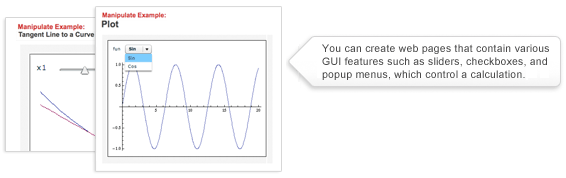
webMathematica 3 contains a new interactive system for replicating the Manipulate command on the web.

Web Services
webMathematica 3 allows you to write a web service that uses Mathematica.

Queuing System
webMathematica 3 comes with a queuing system that allows long-running computations to be executed by webMathematica.

Expression Language and Custom Tags
webMathematica 3 comes with support for a more concise way to call to Mathematica from a web page. It also contains a library for a number of useful tags, which provide a number of useful tools, such as redirecting flow as the web page is generated.

Support for Wolfram Workbench
Wolfram Workbench provides a significant number of features that help accelerate the development of webMathematica material.

Debugging with Wolfram Workbench
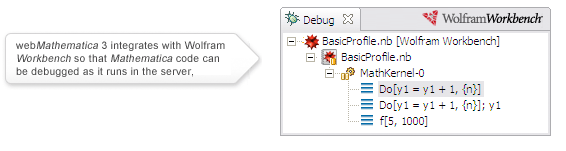
webMathematica 3 works with Wolfram Workbench, allowing Mathematica code to be debugged as it runs in the server.

New Logging System
A new logging system helps track different types of errors and identify problems so that they can easily be resolved.

Improved Kernel Monitor
The Kernel Monitor has been significantly improved.

Improved Kernel Interaction
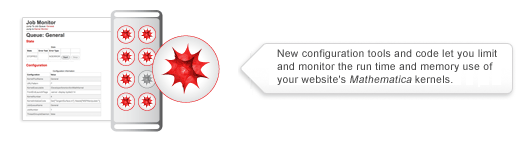
webMathematica 3 has improved the way that it interacts with the Mathematica kernel. In Version 3, kernels are launched in parallel as soon as the server starts, improving the startup time. There is new code for monitoring Java objects, which increases the server's reliability. Version 3 also has a number of new configuration tools that limit the use of time and memory by the kernel, further improving the reliability of the server.


Features Introduced in webMathematica 2

Support for Mathematica 5.2
webMathematica 2.3 comes with Mathematica 5.2. This version takes advantage of the web-development options and performance improvements in Mathematica 5.2, including support for 64-bit-enhanced arbitrary-precision numerics, multithreading support for numerical linear algebra, major vectorization speed-ups, and RSS and vCard import, as well as enhanced charts and visualizations.

Database Connectivity
DatabaseLink provides Mathematica with a powerful, ready-made solution for integrating with any standard database. Integrated with Mathematica 5.2, it provides a convenient bridge between databases and webMathematica. One particularly useful feature for webMathematica is that DatabaseLink contains the HSQL Database Engine (HSQLDB), a lightweight database. This means that users who do not already have a database or who want to experiment with using one do not have to set one up; instead, they can use HSQLDB.

Client Web Services
The Web Services Package allows Mathematica to call web services across the internet. Bundled with Mathematica 5.2, it provides a convenient way for webMathematica to use any web service. This is an important way to extend the functionality of webMathematica websites.

Authoring System Preview
webMathematica Author is an authoring system shipped with webMathematica that aids in the creation and development of webMathematica material.

Simple Installation
webMathematica has a simple installation process that requires minimal configuration beyond the installation of the webMathematica web application.

Extended Documentation and Examples
The documentation for webMathematica is now shipped in HTML, PDF, and notebook formats and is accessible from the webMathematica home page. Many examples have been added to demonstrate new features.

New Templating Mechanism Based on JSP Custom Tags
HTML templating can now be done with JSP (JavaServer Pages) custom tags. This mechanism is easy to understand, allows the use of other JSP custom tag libraries, and facilitates the integration of webMathematica into other server applications.

MathML, SVG, and XML Support
Support for MathML and SVG is built into webMathematica, allowing you to describe equations and graphics in standard XML formats that can be read by browsers.

Support for Catching Message and Print Output
New functions are provided for catching the output of any Mathematica Message or Print statements. This feature can be useful for debugging or developing material.

Support for HTTP File Upload
New functions are provided to support HTTP file upload, allowing users to submit data to a webMathematica web server.

Support for HTTP Session Variables
New functions are provided for saving material in an HTTP session stored in the server. This feature can be useful for saving results from one computation to another.

HTML Formatting Functions
New functions are provided for formatting results such as tables into HTML.


 © 2009 Wolfram Research, Inc.  Terms of Use  Privacy Policy | [ja] [es]